How School Initials Work
Each school in Equity Analytics has a short name, displayed throughout dashboards, tables, and exports.
These short names, often called school initials, make school names easier to read in compact layouts and reports.
By default, the system automatically generates these initials from the school’s full name, but districts can override them at any time.
How It Works
When a new school is added to the platform, Equity Analytics automatically creates a short name based on the words in the school’s full name.
This process ensures every school has a consistent, recognizable abbreviation without any manual setup.
Example of Default Behavior
| Full School Name | Auto-Generated School Initials |
|---|---|
| Riverbend Elementary | RE |
| Oak Valley Middle | OVM |
| Meadowbrook High | MH |
| Lakeside Central High School | LCHS |
| Greenwood 9th Grade Academy | G9GA |
| Eastview Early College | EEC |
| Cedar Hill Senior High School | CHSSH |
These values are generated automatically and appear anywhere the short name is referenced in lists, reports, and exports.
Customizing School Initials
If your district prefers a different abbreviation, you can manually update the school initials (the Initials field) in the school’s record.
Once a custom value is entered, the system will preserve your chosen initials and skip automatic generation for that school in the future.
This allows districts to match local naming conventions or simplify abbreviations used in exports and dashboards.
Example:
- Default:
CMS - Custom district preference:
CEN - The custom initials will remain unchanged during all future updates or data imports.
How to Change School Initials
District Admins, District Users, and School Users can edit school initials at any time.
- Navigate to the school’s Home Page for the initials you want to update.
- Click the red Edit button in the top right corner of the page.
-
Locate the Initials text box, remove the current initials, and enter your preferred abbreviation.
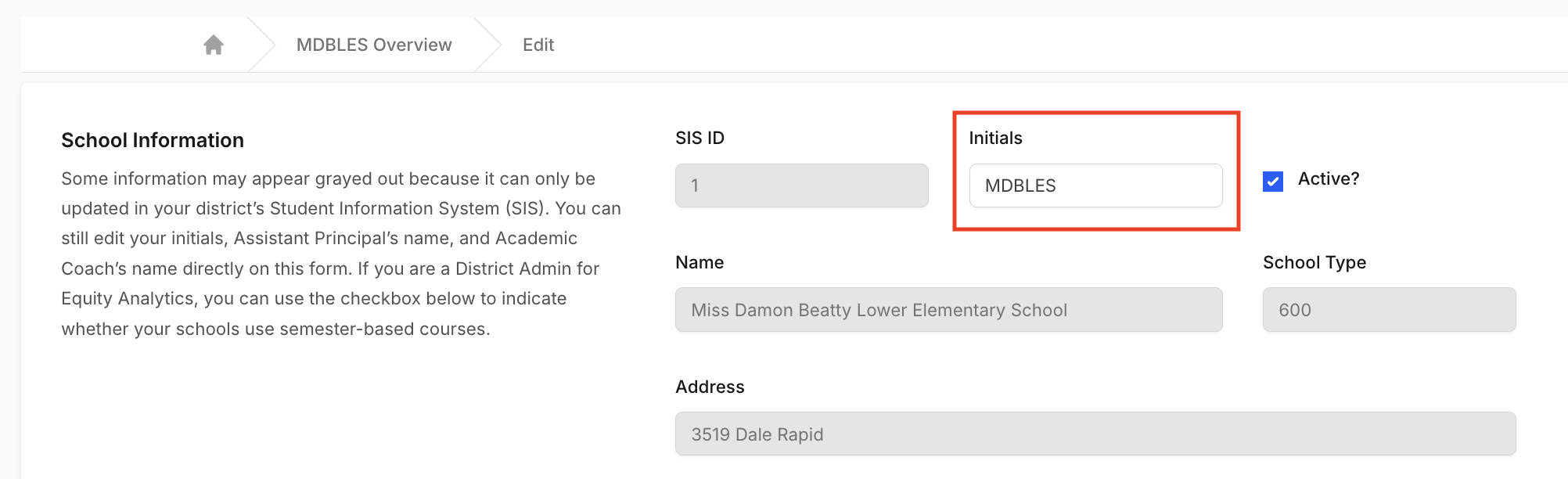 4. Press Update School to save your changes.
Your new initials will immediately appear throughout dashboards, tables, and exports.
Rules
School initials must follow these rules:
- Maximum 10 characters.
- No spaces.
- Letters, digits, and most punctuation (
&,/,@,.,-) are allowed.
If you try to save initials that break these rules, the form will show an error and the school will not be updated.
Best Practices
When setting or editing school initials, keep the following guidelines in mind:
- Use 2–6 letters for clarity and readability.
- Use abbreviations consistent with your district naming standards.
- Remember that once you override the initials, the system will not automatically change them again.
Why It Matters
Customizing school initials helps ensure consistency across reports, especially when:
- Districts have multiple schools with similar names.
- Exported data is shared externally and needs clear identifiers.
- Schools prefer branding or naming conventions different from what is auto-generated.
Support
If your school initials appear incorrectly, or you would like help customizing them:
- Helpdesk Ticket: Helpdesk Ticket
- Website: https://equityanalyticsms.com