Setting School Assistant Principal and Academic Coach
Each school in Equity Analytics can list one Assistant Principal and one Academic Coach to display on dashboards, exports, and reports. These roles help identify school-level leadership and support staff responsible for student achievement, accountability, and instructional coaching.
By default, these fields are blank when a new school is created. District and school staff can update them at any time.
How It Works
The Assistant Principal and Academic Coach names appear on the school’s detail page and are used in relevant dashboards, reports, and exports across Equity Analytics. This allows districts to easily track leadership assignments and ensure accountability data is linked to the right individuals.
These values are stored directly on each school record, similar to how School Initials are managed. Once saved, they remain until changed by a district or school user.
Example:
| School Name | Assistant Principal | Academic Coach |
|---|---|---|
| Riverbend Elementary | Lisa Graham | James Tucker |
| Oak Valley Middle | Anthony Reed | — (not assigned) |
| Meadowbrook High | — (not assigned) | Alicia Smith |
How to Add or Edit Names
District Admins, District Users, and School Users can set or update these fields at any time.
- Navigate to the school’s Home Page for the school you want to edit.
- Click the red Edit button in the top right corner of the page.
- Locate the fields labeled Assistant Principal and Academic Coach.
-
Enter the correct names in each field.
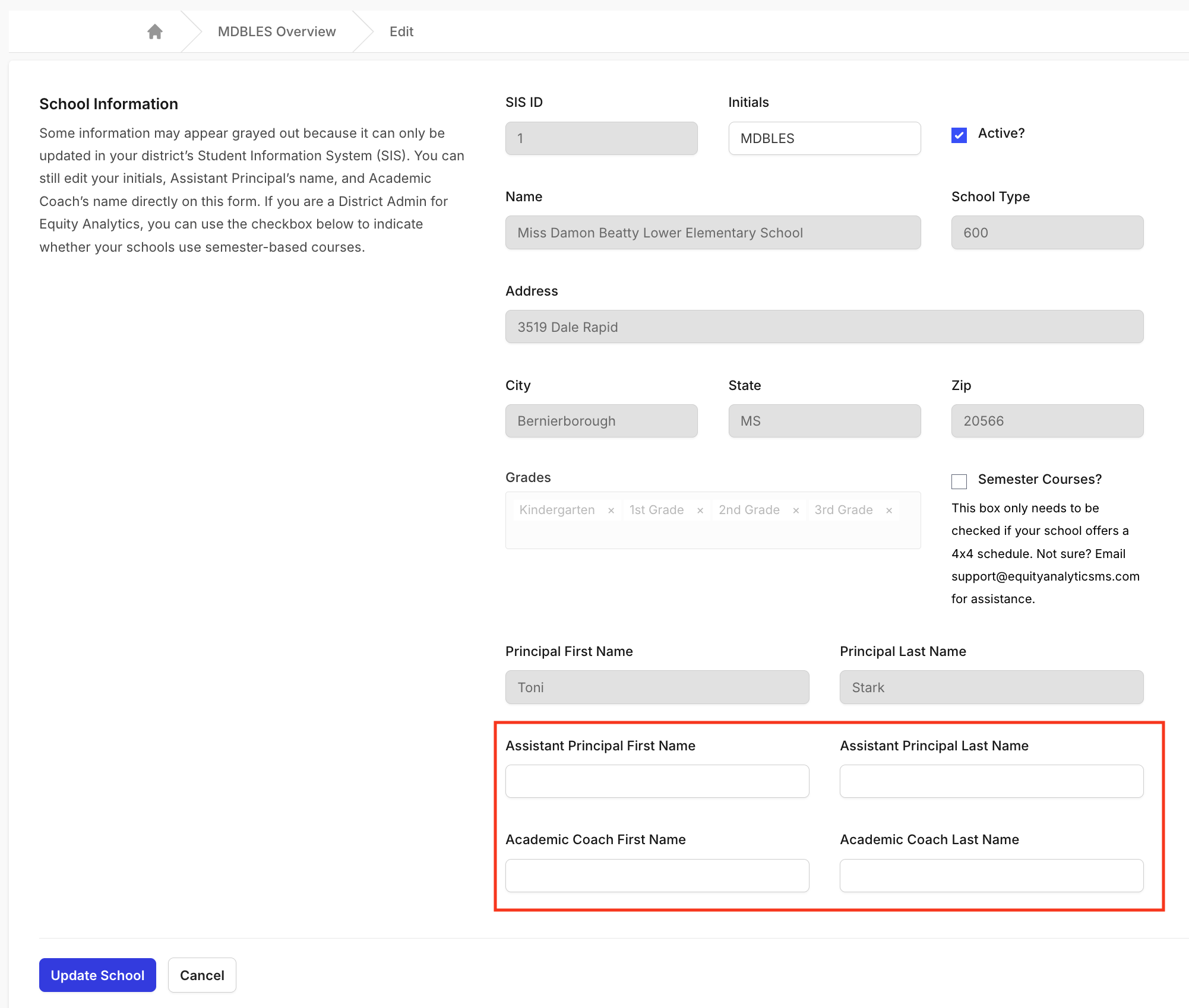 5. Click Update School to save your changes.
Once saved, the updated names will immediately appear throughout dashboards, tables, and exports wherever school leadership is referenced.
Best Practices
When adding or editing school leadership names:
- Enter full names (e.g., “Lisa Graham” instead of “L. Graham”).
- Update these fields promptly when staffing changes occur.
- Leave the field blank if the position is unfilled. The field will remain empty until a name is entered.
- Double-check for typos or title capitalization to maintain consistency across reports.
Why It Matters
Maintaining accurate school leadership information helps:
- Districts quickly identify points of contact for accountability and data discussions.
- Schools ensure leadership recognition in reports and dashboards.
- Users view consistent, professional data across the platform.
Support
If you encounter issues updating leadership names or need assistance:
- Helpdesk Ticket: Helpdesk Ticket
- Website: https://equityanalyticsms.com